
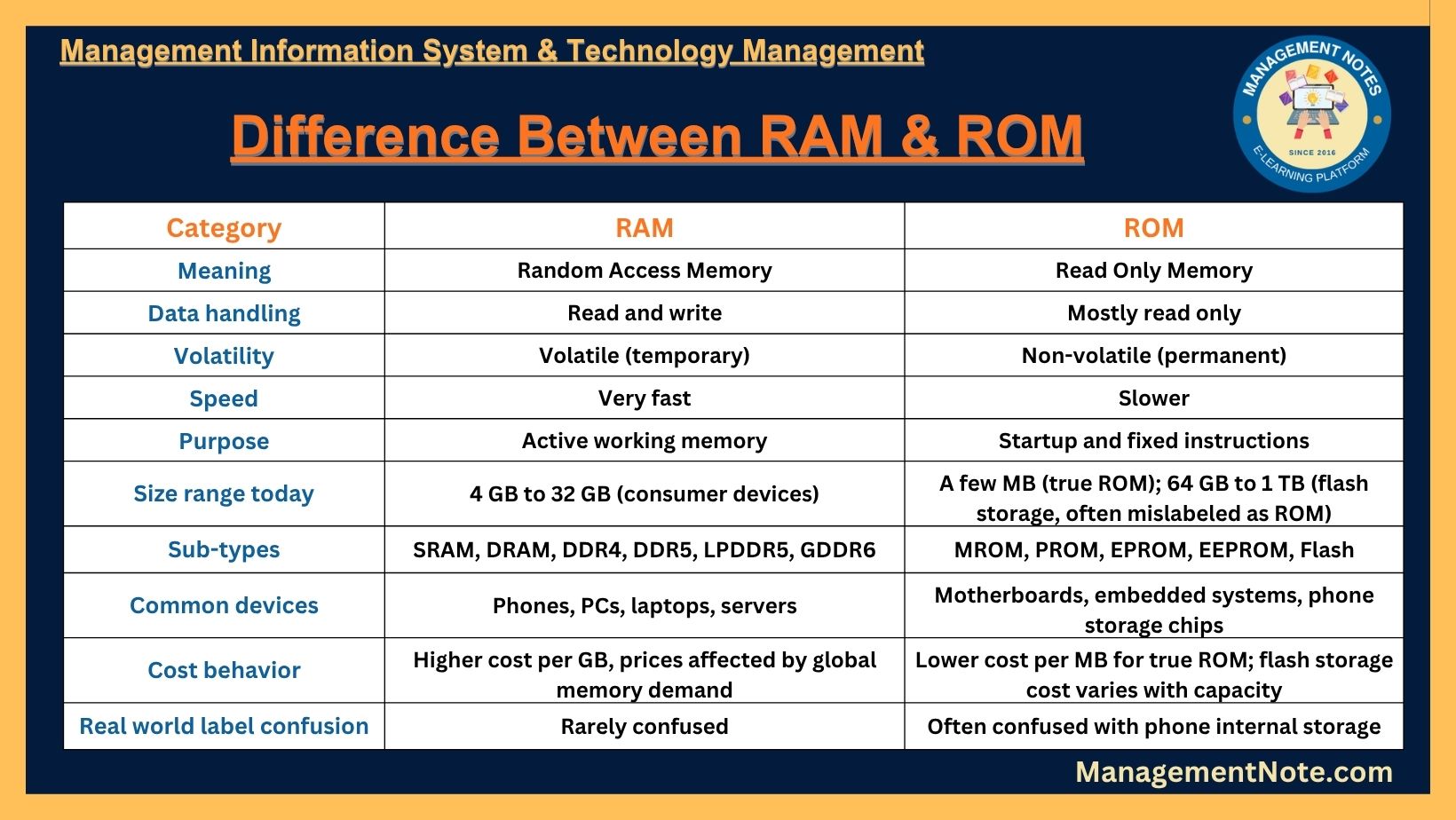
RAM Vs. ROM Explained: Meaning, Types & Key Differences | Primary Memory
Almost everyone who buys a phone, laptop, or gaming PC has seen the words “RAM” and “ROM” written on the box. Many people mix these two words up. Some people even think “ROM” on a smartphone spec sheet means the same thing as “ROM” inside a computer motherboard. It does not.
This guide explains what RAM is, what ROM is, how they are different, how they are alike, and why both matter for the speed and life of your device. It is written in simple English so that students, exam takers, and everyday tech buyers can understand it fully. Every section ends with a short summary table so you can review the topic at a glance.
What Is the Main Difference Between RAM and ROM?
RAM (Random Access Memory) is temporary, fast memory that your device uses while it is turned on. It holds the apps and files you are using right now. RAM loses everything the moment the power goes off.
ROM (Read Only Memory) is permanent memory that holds fixed instructions, such as startup code, that your device needs even before the operating system loads. ROM keeps its data even when the power is off.
In one short line: RAM is your device’s short term working memory, and ROM is your device’s permanent instruction memory.
What Is RAM (Random Access Memory)?
RAM stands for Random Access Memory. It is the main working memory of a computer, phone, or tablet. When you open an app, browse the internet, edit a document, or play a game, the device copies the needed data from storage into RAM so the processor (CPU) can reach it instantly.
The word “random access” means the processor can go straight to any memory cell it needs, in any order, without reading through the cells before it. This is what makes RAM so fast compared to older storage methods that had to be read in a fixed order.
Key points about RAM:
- RAM is a read and write memory. The device can both read data from it and write new data into it very quickly.
- RAM is volatile memory. As soon as the device loses power, everything stored in RAM disappears.
- RAM is built using tiny memory cells on a metal oxide semiconductor (MOS) chip.
- RAM directly affects how many apps you can run at once and how smoothly your device switches between them.
- RAM is found in smartphones, laptops, desktop PCs, servers, gaming consoles, smart TVs, and many other digital devices.
Modern computers usually come with 8 GB to 32 GB of RAM, while high end servers and workstations can use hundreds of gigabytes. Newer flagship phones in 2026 commonly ship with 8 GB to 16 GB of RAM, and Windows PCs are moving toward DDR5 memory as the new standard.
RAM Summary Table

What Is ROM (Read Only Memory)?
ROM stands for Read Only Memory. It is a type of non-volatile memory, which means it keeps its data even when the power is switched off. ROM chips store fixed instructions that a device needs the moment it is turned on, before the full operating system has even loaded.
The most common example is the BIOS or UEFI firmware on a computer motherboard. This firmware tells the computer how to check its hardware and start the boot process. Because this information rarely changes, it makes sense to store it in a memory type that cannot be accidentally erased.
Key points about ROM:
- ROM is mainly a read only memory. In its classic form, data is written into it once during manufacturing and is very hard to change afterward.
- ROM is non-volatile, so it keeps its content safely even without electrical power.
- ROM usually holds a small amount of data compared to RAM, often just a few megabytes, since it only needs to store firmware or fixed instructions.
- Newer versions of ROM, such as EEPROM and flash memory, can actually be rewritten, but this process is slower and less frequent than writing to RAM.
- ROM is essential for a device’s boot up process and for storing instructions that should not change, like firmware.
ROM Summary Table

Why Is RAM Volatile and ROM Non-Volatile?
This is one of the most searched questions about this topic, so here is a simple explanation.
RAM stores information using electrical charges in tiny capacitors or switching circuits. These circuits need a constant supply of power to hold their state. The moment the power supply stops, the charge disappears, and so does the data. This is why RAM is called volatile memory.
ROM stores information using a fixed physical or electrical pattern that is set during manufacturing or through a one-time or rare programming process.
This pattern does not depend on a constant power supply to exist. That is why ROM data remains even when the device is switched off, making it non-volatile memory.
Types of RAM
RAM is mainly divided into two categories: Static RAM (SRAM) and Dynamic RAM (DRAM).
1. Static RAM (SRAM)
Static RAM stores each bit of data using a small circuit called a flip-flop, made of multiple transistors. A flip-flop can hold its state as long as power is supplied, without needing to be refreshed again and again. This makes SRAM very fast.
Because SRAM circuits use more transistors per bit, they take up more space on a chip and cost more to produce. For this reason, SRAM is mostly used in small amounts, such as the CPU cache, where speed matters more than size.
2. Dynamic RAM (DRAM)
Dynamic RAM stores each bit of data using a capacitor and a transistor. A capacitor naturally loses its charge over time, so DRAM must be refreshed thousands of times per second to keep its data correct. This refreshing makes DRAM a bit slower than SRAM, but DRAM cells are much smaller and cheaper to make.
Because of its low cost and high density, DRAM is used as the main memory in almost every laptop, desktop, and smartphone. Over the years, DRAM has developed through several generations, most commonly known as DDR (Double Data Rate) memory:
- DDR3: An older generation, still used in some budget or older devices.
- DDR4: A widely used standard in laptops and desktops through the early 2020s.
- DDR5: The newer generation, offering higher speeds, better power efficiency, and features like on-module error correction. DDR5 is becoming the standard choice for new computers and servers in 2026.
There are also special DRAM types built for graphics cards, known as GDDR (such as GDDR6), and low power versions built for phones and laptops, known as LPDDR (such as LPDDR5).
Types of RAM Summary Table

Types of ROM
ROM has developed over time into several types, based on how the data inside them can be written or erased.
1. MROM (Masked ROM)
Masked ROM is the oldest type of ROM. The data is permanently set by the manufacturer while the chip is being built. Once made, this data can never be changed. It is cheap to produce in large amounts but has zero flexibility.
2. PROM (Programmable Read Only Memory)
PROM is sold blank and can be programmed one single time by the user or the manufacturer using a special device. Inside the chip are tiny fuses. Programming the PROM means permanently burning certain fuses to set the data. Once programmed, it cannot be changed again.
3. EPROM (Erasable Programmable Read Only Memory)
EPROM solved the “one time only” problem of PROM. An EPROM chip has a small quartz window on top. Shining ultraviolet (UV) light through this window for about fifteen to twenty minutes erases the entire chip, resetting it so it can be reprogrammed with new data using a special programmer device. This made EPROM popular for testing and development work.
4. EEPROM (Electrically Erasable Programmable Read Only Memory)
EEPROM improved on EPROM by removing the need for UV light. Instead, data can be erased and rewritten using electrical signals, often one byte at a time, directly on the circuit board. This is more convenient, though it is still slower than writing to RAM.
5. Flash Memory
Flash memory is a modern and popular type of EEPROM. It can erase and rewrite large blocks of data at once, which is much quicker than older EEPROM. Flash memory combines features of both RAM and ROM: like RAM, it can be updated often; like ROM, it keeps its data safely without power. Flash memory is used in USB drives, memory cards, solid state drives (SSDs), and the internal storage of smartphones.
Types of ROM Summary Table

RAM Vs ROM: Full Comparison Table
| No. | Point of Comparison | RAM (Random Access Memory) | ROM (Read Only Memory) |
|---|---|---|---|
| 1 | Full form | Random Access Memory | Read Only Memory |
| 2 | Basic nature | Read and write memory | Mostly read only memory |
| 3 | Volatility | Volatile; data is lost when power goes off | Non-volatile; data stays even without power |
| 4 | Speed | Very fast, measured in gigabytes per second | Slower, measured in megabytes per second |
| 5 | Main use | Runs apps and holds active data while the device works | Stores fixed startup instructions, like BIOS or firmware |
| 6 | When it is used | During normal operation, after the operating system starts | Mainly during the start-up (boot) process |
| 7 | Typical storage size | Several gigabytes (GB), commonly 8 GB to 32 GB | A few megabytes (MB) on most devices |
| 8 | Cost per unit of storage | Generally higher cost per gigabyte | Generally lower cost per gigabyte |
| 9 | Data writing speed | Fast and frequent | Slow and infrequent |
| 10 | Physical structure | Built from transistors and capacitors (or flip-flops) | Built from fixed circuits or floating gate transistors |
| 11 | Examples | SRAM, DRAM, DDR4, DDR5, LPDDR5 | MROM, PROM, EPROM, EEPROM, Flash memory |
| 12 | Effect on performance | Directly affects multitasking and overall speed | Ensures reliable and safe device startup |
Similarities Between RAM and ROM
While RAM and ROM are different in many ways, they are also alike in a few basic points:
- Both are types of internal or primary computer memory, not external storage devices like hard drives.
- Both are built using semiconductor technology on small chips.
- Both are essential for a device to function correctly; a device cannot boot or run without both types of memory.
- Both are measured in bytes, kilobytes, megabytes, or gigabytes.
- Both are found inside almost every modern digital device, from smartphones to smart appliances.
RAM Vs ROM in Smartphones: Clearing Up the Confusion
Many people search for phrases like “128 GB RAM 8 GB ROM” or “what does ROM mean on a phone” because phone spec sheets in some regions use the word ROM loosely.
Here is the truth: on most modern smartphones, the “ROM” figure listed in the specifications (such as 128 GB or 256 GB) does not refer to true Read Only Memory.
It actually refers to the phone’s internal storage, which is built using flash memory (a type of rewritable NAND flash, technically related to EEPROM). This storage holds your photos, videos, apps, and files permanently, similar to how a hard drive works on a laptop.
The “RAM” figure listed (such as 6 GB or 8 GB) is the true, temporary working memory of the phone, just like RAM in a computer.
So when you see a phone listed as “8 GB RAM, 128 GB ROM,” it really means the phone has 8 GB of working memory and 128 GB of internal storage space. This labeling comes from older phone marketing habits and has stuck around, even though it is technically inexact.
Which Is Faster: RAM or ROM?
RAM is faster than ROM. RAM read and write speeds are measured in gigabytes per second, while classic ROM read speeds are measured in megabytes per second. This large speed gap is exactly why RAM is used for active tasks and ROM is used only for fixed instructions that do not need to be accessed at high speed.
Which Is More Important: RAM or ROM?
Both are important, but for different reasons. Without ROM (or its modern replacement, firmware storage), a device would not know how to start up at all. Without enough RAM, a device would start up but run very slowly and struggle to keep multiple apps open. In short, ROM lets a device wake up, while RAM lets a device actually work well once it is awake.
Can You Upgrade RAM and ROM?
RAM: On many desktop computers and some laptops, RAM can be upgraded by adding or replacing memory modules. However, on most smartphones and many modern thin laptops, RAM is fixed at the time of manufacture and cannot be upgraded later.
ROM: Traditional ROM chips generally cannot be upgraded by users, since they are built for one fixed purpose. However, the flash-based storage in phones and the firmware in modern motherboards can often be updated through software, even if the raw storage capacity itself cannot always be expanded.
Master Summary Table: RAM and ROM at a Glance
| Category | RAM | ROM |
|---|---|---|
| Meaning | Random Access Memory | Read Only Memory |
| Data handling | Read and write | Mostly read only |
| Volatility | Volatile (temporary) | Non-volatile (permanent) |
| Speed | Very fast | Slower |
| Purpose | Active working memory | Startup and fixed instructions |
| Size range today | 4 GB to 32 GB (consumer devices) | A few MB (true ROM); 64 GB to 1 TB (flash storage, often mislabeled as ROM) |
| Sub-types | SRAM, DRAM, DDR4, DDR5, LPDDR5, GDDR6 | MROM, PROM, EPROM, EEPROM, Flash |
| Common devices | Phones, PCs, laptops, servers | Motherboards, embedded systems, phone storage chips |
| Cost behavior | Higher cost per GB, prices affected by global memory demand | Lower cost per MB for true ROM; flash storage cost varies with capacity |
| Real world label confusion | Rarely confused | Often confused with phone internal storage |
Frequently Asked Questions About RAM and ROM
What is the full form of RAM and ROM?
RAM stands for Random Access Memory, and ROM stands for Read Only Memory.
Is RAM permanent or temporary memory?
RAM is temporary memory. It only holds data while the device has power, and it clears out that data once the device is turned off.
Is ROM volatile or non-volatile?
ROM is non-volatile memory. It keeps its stored data safely even without a power supply.
Which is bigger in size, RAM or ROM?
On a typical computer, RAM usually offers more total storage space (often several gigabytes) than a true ROM chip (usually just a few megabytes). However, on smartphones, the flash storage labeled as “ROM” is much larger than RAM, because it is being used to store personal files, not just startup instructions.
Can ROM be rewritten?
Classic ROM and PROM cannot be rewritten after they are made. However, newer types like EPROM, EEPROM, and flash memory can be erased and rewritten, though this is still slower than writing to RAM.
Does more RAM make a phone or computer faster?
More RAM generally allows a device to keep more apps open at once without slowing down or restarting them. Beyond a certain point, however, extra RAM gives smaller performance gains if the processor or storage speed becomes the bottleneck instead.
What happens if RAM is full?
When RAM becomes full, the operating system starts moving some data to a slower backup space on the storage drive, often called a swap file or virtual memory. This can make the device feel slower until RAM frees up again.
What is an example of RAM in everyday devices?
Examples include the memory sticks inside a desktop computer, the built in memory chips in a smartphone, and the memory used inside gaming consoles.
What is an example of ROM in everyday devices?
Examples include the BIOS or UEFI chip on a computer motherboard, the firmware chip in a washing machine or microwave, and the boot chip inside many embedded devices.
Why do phones list ROM instead of storage?
This labeling comes from early mobile phone marketing, where basic built-in memory was loosely called ROM. The term stuck in many regions even though the actual technology used today is rewritable flash memory, not classic Read Only Memory.
Conclusion
RAM and ROM are both types of memory that a computer, phone, or smart device needs to work properly, but they serve very different jobs. RAM is the fast, temporary memory a device uses while it is actively running apps and tasks, and it forgets everything once the power is switched off. ROM is the slower, permanent memory that stores fixed startup instructions, and it keeps this data safely even without power.
Knowing the difference between RAM and ROM helps you understand computer basics, choose the right device specifications when shopping for a phone or laptop, and prepare confidently for exams or interviews that test this classic computer science topic.
You May Also Like:

MBA- Finance Specialization
I am Smirti Bam, an enthusiastic edu blogger with a passion for sharing insights into the dynamic world of business and management through this website.
I hold a MBA degree from Presidential Business School, Kathmandu, and a BBA degree with a specialization in Finance from Apex College,
- Onboarding Vs. Orientation: Key Differences, Benefits, Process & Best Practices | Human Resource Management (HRM) - September 24, 2026
- Moonlighting Vs Freelancing: Meaning, Differences & Risks Explained | Human Resource Management (HRM) - September 14, 2026
- Employee Retention Vs. Employee Engagement: Key Differences Explained | Human Resource Management - September 6, 2026


I absolutely love your blog and find most of your post’s to be what precisely I’m looking for. Do you offer guest writers to write content to suit your needs? I wouldn’t mind writing a post or elaborating on some of the subjects you write related to here. Again, awesome web site!